


All Activity
- Last week
-
 May need to look into this but as a custom filter in Invision, it may be doable but as an initial filter on the category listing, it may not happen.
 -
I like this idea. However, per Invision's setup of blocks, the same blocks (aka widgets) would show on all the categories and with block caching, it would not be really feasible to show these dependent on those pages.
-
Are you stating that you want the Makes/Models to decide which category a vehicle gets put in or that you want a specific list of Makes/Models available for Category A and a whole different list of Makes/Models for Category B? While I won't say never to either of these, it may be complex to do the latter with how Invision has these lists for Makes/Models that we use. For most organizational things, I would recommend in the meantime, to make things relatively straight forward for your users. Can think of it likes Forums are now. You may have a forum for "Sports Cars" and another for "SUV/Trucks" but if someone were to place a 1965 Pontiac GTO topic in your "SUV/Trucks" forum, you would just move it to the "Sports Cars" forum and educate the user. Same thing here, for the most part, making distinct categories so that users know where to place things and then have mods educate your users is the best way to organize.
-
 Would be nice to be able offer a filter to look at a certain Make and optionally model.
 -
In the sidebar it would be great to have a Random Garage widget but the ability to select all Garages (which would use all categories) or pick a category and show random garages for that category so the widget could be used on different pages that align with the category. The widget would display photos from the garages for the configured category.
-
It would be nice to keep the Makes/Models organized by assigning them to a category. Example if I have a Category called Vehicles I could assign all the vehicle Makes & Models to that Category and I have another Category called Powersports and an entirly different list of Makes & Models would go to this Category.... so on and so forth. If possible would love to include the logo of the "Make/Manufacture" and even possibly the Model
-
Dennis Hosang joined the community
-
 Great thanks for the explanation and update
 - Earlier
-
Happy New Year! So the List All page is a conglomeration of all potential categories in the application. Whereas, a single category page lists vehicles for that category. The latter has the add button on it as you are in the category you’ll add to. If you only have 1 category, it’s likely better to continue your redirect. I have some improvements in mind to improve the experience in the case of only one category but haven’t had time with holidays to code them.
-
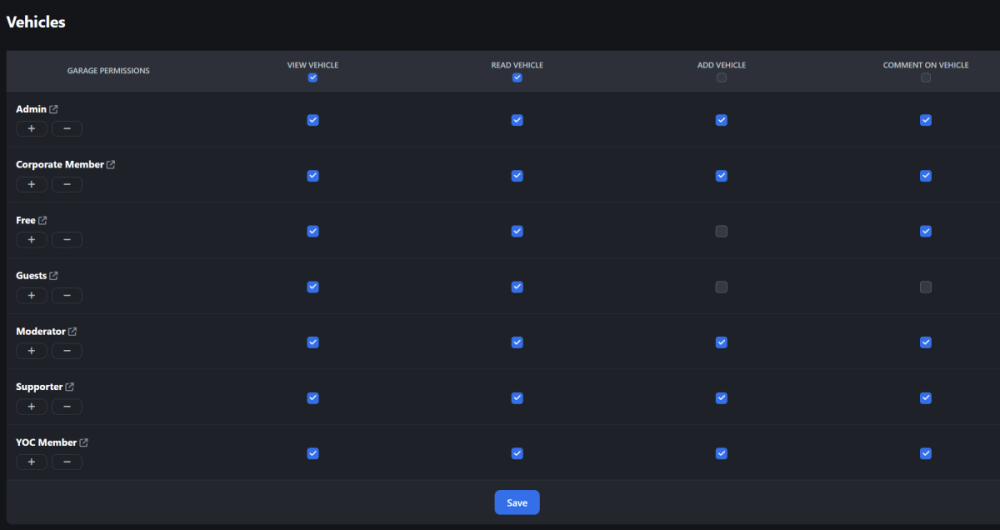
Ok I've fixed it for now by changing the menu nav link from https://yamahaclub.com/garage/list-all/ to https://yamahaclub.com/garage/category/1-vehicles/ But shouldn't the list-all page have the buttons too?
-
-
Hi and happy new year. Not sure what's happened but i just received a message saying a user can't work out how to add their vehicle. On closer look myself I can't seem to add one either, the permissions seem fine, any ideas? Cheers Alex
-
 mk5912 joined the community
 -
We’re rolling out a new performance-focused enhancement for Garage This OR That—automatic, CloudFlare-driven image resizing for Garage uploads. ⚡ What’s New?When Garage images are displayed inside This OR That, CloudFlare will now: Resize large images on-the-fly to a more efficient, container-appropriate size Serve optimized versions directly from the edge Reduce file weight while maintaining clarity Speed up load times for both desktop and mobile users 🚀 Why This MattersGarage uploads can vary widely in resolution—even extremely large, multi-megapixel images. While great for detail, these oversized files can slow down page loads and impact performance. By using CloudFlare’s built-in image resizing, we ensure that: Images load faster Bandwidth usage is reduced Comparisons render more efficiently Performance remains consistent across devices and connections ☁️ CloudFlare RequiredThis enhancement applies only when your site is running through CloudFlare, since it relies on their edge image optimization.
-

-

-
-
JimmoTest joined the community
-
 bskdisplay joined the community
 -
 Jamie Cha joined the community
 -
 Thank you :)
 -
 Thank you for the update ;)
 -
This should be resolved now in 1.0.15 😊
-
This should be resolved now in 1.0.15 😊
-
Let's say I have 11 vehicles in my garage, and I want to put one of them up for sale within my community. There will be a "List this vehicle for sale" button on each vehicle's page. When I list it for sale, the number of vehicles I have for sale will be shown in my postbit on the forum. Other members will be able to make offers on my vehicles for sale. When they make an offer, the system will notify me through alerts. If a member prefers, they can disable the ability to receive offers. What do you think? I believe this would be a great feature!
-
Hello, i noticed a bug in profil activity with Garage : When you add a vehicule and add an image : you need to select the default image. If you don't do it or if there is no image, the following error is showed on profil : [[Template core/front/profile/profileActivity is throwing an error. This theme may be out of date. Run the support tool in the AdminCP to restore the default theme.]] In video : https://www.loom.com/share/ce38466ccff644c88cfacda2222a5c0e?sid=09b78983-b732-4b94-91aa-bb3a1c11e499 Thanks
-
The same problem occurred after the update instead of opening as a carousel, it redirects to the link like it used to.
-
 ucjohn joined the community
 -
Thanks :)
-
Easy fix so its already out :)
-
Likely a timeout as you only have 1 vehicle. It isn't designed for one vehicle or less. I'll add a bug report to have it gracefully fail.


