


Jimmo
Administrators
-
Joined
-
Last visited
Everything posted by Jimmo
-
Added a temporary fix for this while I am waiting on a resolution to this issue inside in the Invision SDK.
-
Ah, I see now. Invision isn't including the Javascript on import. Let me see what's going on with them.
-
Have you upgraded the app and cleared your cache? I am not seeing that the required changes are present.
-
-
OK, 1.0.11 should fix that issue. Glad to hear you like it!
-
Ah, ok. I see now, it for some reason isn't going to the main one when secondary images are clicked. Thanks! I'll take a look at this.
-
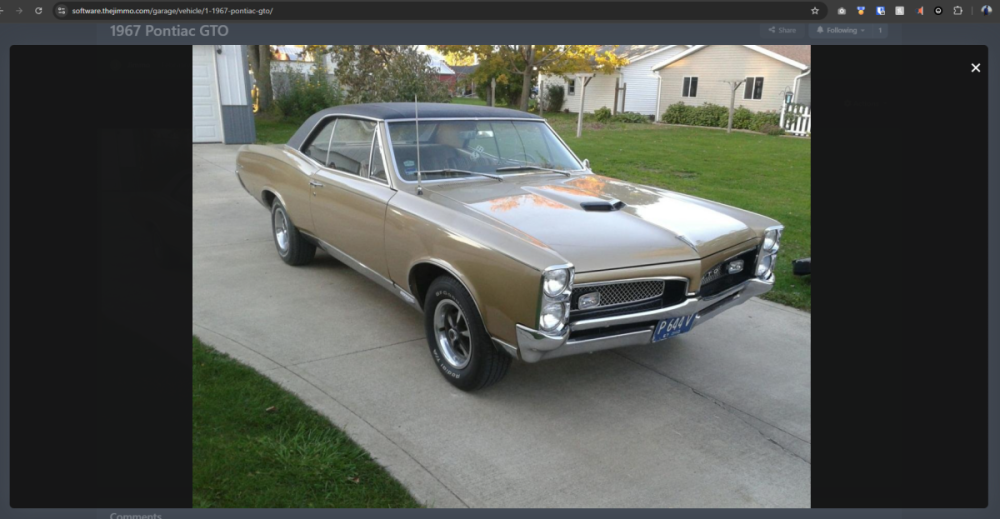
It does indeed open in the popup lightbox used by Invision. If you're having an issue, I would need an example here to investigate. Here's the demo on our site here:
-
As that is a third party application from myself, that is outside my scope of support. You would need to contact the author of that plugin.
-
If it’s from the logs then it is someone accessing a wrong or outdated link. Happens all the time with links, especially on busy sites, just shouldn’t be logged as an error in the system log.
-
Modifications likely won't be making it into my Garage app (I won't say never but have to be a pretty large demand lol) as personally, I'd like to expand more with custom fields. With that said, Custom Fields are very flexible as it stands now and you can create a category called Modifications or Wishlist with corresponding fields that you want the user to fill out. It likely won't be as robust as Modifications was in Collections but at least be able to let users share what they've done to their vehicle. Conditional custom fields based upon what category the vehicle belongs to is an interesting idea.
-
It is completely different from the ground up. All language keys will be different.
-
That vehicle doesn't exist. Is this from a log you're encountering this or did you run into this in the app? I've improved that error handling though in 1.0.10.
-
However, in looking into this issue, I did find that I am missing a template for comments in profiles so that is added in 1.0.9 and updated in the Downloads area.
-
This is an issue in the core software. On lines 1401-1428 of /System/Content/Comment.php, they don't specify the database table and due to there are joins on this, it is causing this ambiguous column error in the query. The below: if ( IPS::classUsesTrait( get_called_class(), 'IPS\Content\Hideable' ) and $includeHiddenComments === Filter::FILTER_ONLY_HIDDEN ) { /* If we can't view hidden stuff, just return an empty array now */ if( !static::modPermission( 'view_hidden', $member ) ) { return array(); } if ( isset( static::$databaseColumnMap['approved'] ) ) { $where[] = array( static::$databasePrefix . static::$databaseColumnMap['approved'] . '=?', 0 ); } elseif ( isset( static::$databaseColumnMap['hidden'] ) ) { $where[] = array( static::$databasePrefix . static::$databaseColumnMap['hidden'] . '=?', 1 ); } } elseif ( IPS::classUsesTrait( get_called_class(), 'IPS\Content\Hideable' ) and ( $includeHiddenComments === Filter::FILTER_OWN_HIDDEN OR $includeHiddenComments === Filter::FILTER_PUBLIC_ONLY ) ) { if ( isset( static::$databaseColumnMap['approved'] ) ) { $where[] = array( static::$databasePrefix . static::$databaseColumnMap['approved'] . '=?', 1 ); } elseif ( isset( static::$databaseColumnMap['hidden'] ) ) { $where[] = array( static::$databasePrefix . static::$databaseColumnMap['hidden'] . '=?', 0 ); } }Should be changed to: if ( IPS::classUsesTrait( get_called_class(), 'IPS\Content\Hideable' ) and $includeHiddenComments === Filter::FILTER_ONLY_HIDDEN ) { /* If we can't view hidden stuff, just return an empty array now */ if( !static::modPermission( 'view_hidden', $member ) ) { return array(); } if ( isset( static::$databaseColumnMap['approved'] ) ) { $where[] = array( static::$databaseTable . '.' . static::$databasePrefix . static::$databaseColumnMap['approved'] . '=?', 0 ); } elseif ( isset( static::$databaseColumnMap['hidden'] ) ) { $where[] = array( static::$databaseTable . '.' . static::$databasePrefix . static::$databaseColumnMap['hidden'] . '=?', 1 ); } } elseif ( IPS::classUsesTrait( get_called_class(), 'IPS\Content\Hideable' ) and ( $includeHiddenComments === Filter::FILTER_OWN_HIDDEN OR $includeHiddenComments === Filter::FILTER_PUBLIC_ONLY ) ) { if ( isset( static::$databaseColumnMap['approved'] ) ) { $where[] = array( static::$databaseTable . '.' . static::$databasePrefix . static::$databaseColumnMap['approved'] . '=?', 1 ); } elseif ( isset( static::$databaseColumnMap['hidden'] ) ) { $where[] = array( static::$databaseTable . '.' . static::$databasePrefix . static::$databaseColumnMap['hidden'] . '=?', 0 ); } }I'll report this to Invision.
-
Garage requires at least 1 image so what you’re seeing is from the migration from Collections which will eventually fade away as your users add more vehicles to the garage app.
-
Looks like you’re using it as a dropdown. First level items aren’t clickable in IPS’ dropdowns. See our demo menu here 🙂 Where are you seeing this? In categories, I am getting filtered as expected.
-
So you had existing categories in Collections so I was able to import those over so now, I just adjusted the permissions of that category and vehicles are visible. You can do this by going to ACP -> Garage -> Categories -> Permissions. I only add view/read permissions so you will need to specify which groups you want to be able to create and comment.
-
Just a heads up, this is a public forum so be sure to send a private message when asking for credentials. I've hidden your post for security.
-
The migration should place all vehicles into a "Convert" category. You will want to go into the categories and review your permissions for that category. Doesn't look like I have permission there to see anything in the Garage app so can't tell anything further at this point. If you want to private message me access details, I can help look further.
-
Hmm, that is a core file from Invision that it can't find. Please try to upload all files again from the Invision Client Area. Namely this one is in: \system\Extensions\ContentRouterAbstract.php Need to ensure that it is there and up to date. Would upgrade to Invision 5.0.2 as it contains some fixes to the uninstall procedure.
-
Definitely things to ponder. Love your feedback, dude. Appreciate your time to leave it!
-
Do like that name, more concise. Do want it to be a little more agnostic so that it wasn't user vs user but vehicle vs vehicle. Don't want it to turn into a popularity contest. I'll have to see what that can look like in item 2. Item 3, I'm a little hesitant on doing something like this. I know my community and many others use these contests to increase engagement on the forums and a lot of discussion comes out of that. The positive effect would be it would be easier on the organizer to put together the entries 🤣. Have to play with that idea for another app as it's something I've been considering for a while, just don't want to break that engagement. Having an option to put the entries back into the topic may be a way to do it but have to see what that looks like.
-
Yeah, was a core part of the app but now that we made it not required, I think we'll probably end up doing that. Let me see what that impacts. Also, will bridge us out of not just a Garage app so have to ponder that.
-
-


