


Rocketfoot
Members
-
Joined
-
Last visited
-
Excellent! big red error message give me anxiety! Thanks!!
-
I clicked DELETE to delete the migratio n data on the Migration page and this error popped up: SELECT step FROM ibf_garagemigration_progress AS garagemigration_progress WHERE step!='finished' IPS\Db\Exception: Table 'bigmackt_ipb.ibf_garagemigration_progress' doesn't exist (1146) #0 /home/bigmackt/public_html/system/Db/Select.php(402): IPS\Db->preparedQuery('/*bigmackt_ipb:...', Array, true) #1 /home/bigmackt/public_html/system/Db/Select.php(598): IPS\Db\Select->runQuery() #2 [internal function]: IPS\Db\Select->count() #3 /home/bigmackt/public_html/applications/garagemigration/modules/admin/migrate/create.php(52): count(Object(IPS\Db\Select)) #4 /home/bigmackt/public_html/system/Dispatcher/Controller.php(139): IPS\garagemigration\modules\admin\migrate\create->manage() #5 /home/bigmackt/public_html/applications/garagemigration/modules/admin/migrate/create.php(38): IPS\Dispatcher\Controller->execute() #6 /home/bigmackt/public_html/system/Dispatcher/Dispatcher.php(169): IPS\garagemigration\modules\admin\migrate\create->execute() #7 /home/bigmackt/public_html/admin/index.php(15): IPS\Dispatcher->run() #8 {main}
-
Is there something to finalizing the migration or just making sure it is finished the way I want it to be...and then uninstall the Migration tool?
-
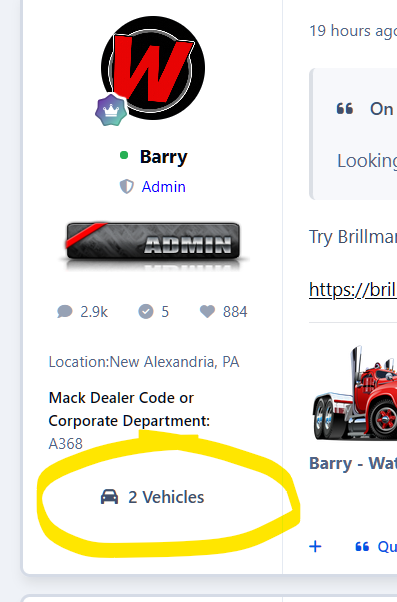
I think what happened is that twice I added a test vehicle and then deleted them but the counter still shows 2. Deletion didn't reset the post profile counter maybe? Thanks! RF
-
Just wondering if I can delete the Migration app after everything is run and migrated properly or does it need to stay in the application list?
-
Search index rebuild finished up overnight but the 2 vehicle count is still there...
-
In the new vehicle form, the dropdown only allows for vehicle years down to 1926 but I have members with trucks that go back to 1900. Is there a way to change the dropdown to 1900 - 2026?
-
I just noticed that my post profile shows 2 vehicles but when I click on the link, there are no vehicles added under my profile (which is true...I do not have any added at the moment) Is there a way to run a recount or something?
-
Sorry! 1 last thing I noticed is that I was able to post a new vehicle as a Guest. I double checked and I have the permissions set to view and read but not to post or comment!
-
I also noticed that when editing a member's vehicle, I tried to change the category that it was listed in but it did not change after SAVE. I was able to move it from the select box from category view.
-
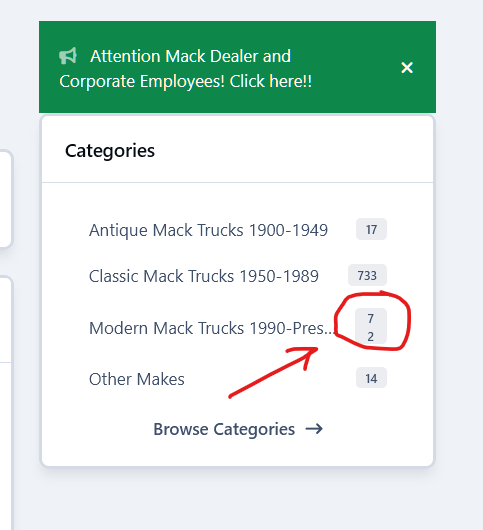
I did some testing this morning and discovered that the core Year, Make and Model are being used to compose the title. I deleted my custom year, make and model fields since they are redundant but I was worried that it would remove the info from the migrated titles but it didn't! So I think everything is OK at this point. The only things I noticed are that the new vehicle form fields do not match the order of the vehicle display listings (maybe not a big issue but would be a nice touch) and the side bar widget has an extra line return or something between the item count on one of my categories...see screen shot.
-
I sent a PM with acp details so you can take a look if you have time. I reinstalled and migrated data but it still has a bunch of duplicates in the add form and reorder issues.
-
OK but doesn't it seem like it is pulling the info in to the wrong custom fields? I did change make, model and vin from field 17, 18 and 19 I think it was.
-
I deleted year and description and they are also gone from the truck listing on the live side...
-
I can delete the custom fields and the existing data will be fine?
